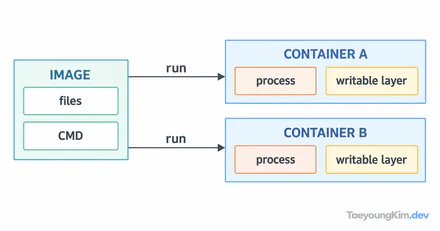
After running a database container with docker run --rm, you may need its data again. First check where the files were written. --rm removes the stopped container; data left only in its writable layer should not be expected to remain. Put files you need to keep in separate storage, such as a named volume.
A named volume is storage managed by Docker
The first container writes note.txt into the demo-data volume and exits with --rm. A second container mounts the same volume and reads hello. Persistence on one Docker host is not a backup.
docker volume create demo-data
docker run --rm -v demo-data:/data alpine:3.20 sh -c 'printf "hello\n" > /data/note.txt'
docker run --rm -v demo-data:/data:ro alpine:3.20 cat /data/note.txt
If the last command prints hello, the volume retained the file after the first container exited. --rm cleaned up that container, not the named demo-data volume. This is convenient for development or a single host, but it does not provide backup or disaster recovery. Decide where the volume lives and how it will be backed up and restored.
You can mount the same volume in another container. If two containers write simultaneously, the application must still maintain data consistency.
A bind mount exposes a host path directly
A bind mount can be convenient for letting a development container read local source files. It also brings host-specific path and permission differences and may let a container change more host files than intended.
If a bind-mounted file is missing inside the container, check the host path as well as the container path. A relative path depends on where you ran the command, and host ownership and permissions still matter. For production data, make paths read-only when writes are unnecessary and avoid exposing an entire parent directory without reason.
Separate three checks when data seems missing
If the exercise does not print hello, do not immediately delete and recreate the volume. Confirm that both commands use demo-data, that both mount it at /data, and that the application reads /data/note.txt.
docker volume inspect demo-data
docker run --rm -v demo-data:/data:ro alpine:3.20 ls -la /data
docker run --rm -v demo-data:/data:ro alpine:3.20 cat /data/note.txt
inspect checks the volume known to Docker. The next two commands mount it read-only and inspect the directory and file. If the volume exists but the file does not, revisit the write path. If the file exists but the application cannot read it, inspect the runtime user and permissions. These checks show persistence, not successful backup.
Persistence and backup are different jobs
A retained volume means its lifetime is separate from the container on the same Docker host. It does not protect against disk failure or a mistaken cleanup command. Keep a recovery copy elsewhere and periodically restore it to a new volume to verify that the application can start from it.
For a shared volume, also decide ownership, permissions, and simultaneous-write rules. Review deletion candidates before running a command such as docker volume prune; keep important data's retention policy separate from routine container cleanup.
Key takeaways
Containers can be replaced, but important data should survive them. A named volume is persistent storage managed by Docker; a bind mount connects a host path. With either approach, plan backup, restore, and permissions separately, and avoid leaving critical data only in a container's writable layer.