A user says “Write a report,” and an AI immediately produces a final-results report. The user actually wanted a progress report. The problem is not the prose; it is that the workflow never established who decides which report to write.
What should a system prompt establish?
For a work assistant, a recurring rule could be: ask for the report type first, request the information required by that type's template, and do not invent missing facts. Put such shared behavior in the system prompt so users do not have to repeat it with every request.
Role: Help draft work reports.
Rule: If the report type is missing, ask for it first.
Rule: Do not invent an owner, date, or result the user did not provide.
Output: Draft a report using the confirmed type's template.
This is a shortened illustration of responsibility, not a deployed product configuration. Calling something a “system” prompt does not automatically verify facts or grant access permissions.
What belongs in the user request?
The system input defines the repeated role and question rule. The user supplies the goal and facts for this report. When required information is absent, ask before drafting.
If the request only says “Write a report,” the type is unspecified. Instead of choosing a results, progress, or instruction report arbitrarily, ask which one the user needs. After the user says “this week's progress report,” the completed work, remaining work, or reporting period may still be missing. Ask only for necessary details, then draft from confirmed information: question → confirm facts → draft → user feedback.
How should missing information appear in the response?
Suppose the entire input is:
Report type: Weekly progress report
Completed work: Revised the login screen copy
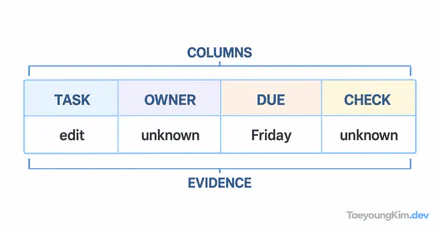
You can use the completed-work fact. You do not yet know the owner or date. Making up a name or date would yield a polished but false document. Leave those fields unconfirmed or ask for them.
| User input | Expected next action |
|---|---|
| “Write a report” | Ask whether it is an instruction, progress, or results report |
| “Weekly progress report; revised login copy” | Ask for missing template facts such as period or owner, or mark them unconfirmed |
| Type and all required facts supplied | Draft from those facts and request review |
These are review criteria, not recorded model outputs. If the bot produces the same full report for all three inputs, check whether its question rule failed or the application reused a type from an earlier conversation.
What must be enforced outside the prompt?
Application authentication and authorization decide who can access or save a report; a model's tone cannot enforce those controls. A document attached by a user is task data, not an instruction to change server security settings. If the application can save or send a report automatically, keep review and approval as separate steps.
Key takeaways
Put recurring role and question rules in the system prompt, and put this report's type and facts in the user request. Ask when the type or a required fact is missing rather than filling it in plausibly. Prompts can guide the workflow, but they do not replace access control or final approval.