An AI produces a neat work report table, but the Owner column is missing. Smooth wording does not make a table usable if it has lost a required field. Check whether the format includes every required column separately from whether each value is supported by the input.
Why check structure and facts separately?
Imagine a work-instruction template requiring four columns: Task, Owner, Deadline, and What to check. The user provided only “Revise the guidance text” and “by Friday.” The template has four columns, but the input supplies only two facts.
| Task | Owner | Deadline | What to check |
|---|---|---|---|
| Revise the guidance text | Needs confirmation | Friday | Needs confirmation |
Leave What to check unconfirmed just as you do Owner. An author could propose “compare the copy before and after,” but should label it as a proposal for review, not a fact from the note. Deleting a column to hide missing information makes it harder for a reviewer to see what remains unresolved.
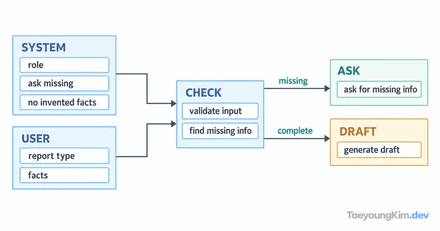
The diagram shows two separate checks after generation: first column presence, then evidence for values.
Keep all four required columns. If the note has no owner or checking task, leave those values unconfirmed rather than removing the columns or inventing content.
How should you request the output format?
Instead of “make a table,” name the columns and how to handle missing values:
Draft a work-instruction table from the note below.
Keep the columns Task, Owner, Deadline, and What to check, in that order.
If the note does not identify an owner, write “Needs confirmation” instead of guessing.
Label any suggested content separately as something to confirm with the user.

Note: Revise the guidance text by Friday.
Four columns do not guarantee accurate values. A format check looks for names, order, and omissions; a fact check asks whether each value comes from the note or is an explicitly marked suggestion.
How do you test missing-field behavior?
Keep the template fixed and vary only the input:
| Input note | Expected result |
|---|---|
| “Revise the guidance text by Friday” | Four columns; owner and checking task need confirmation |
| “Revise the guidance text by Friday; Mina owns it” | Use the supplied owner; checking task still needs confirmation |
| “Handle it by Friday” | Ask what the task is before finalizing a work instruction |
These are review expectations, not observed outputs from a model. A single attractive table is not proof that the format is reliable. If a test fails, check whether a required column disappeared, whether the model filled a missing fact, or whether it mixed a suggestion with a fact. State the failed condition directly rather than piling on vague instructions.
Where does human review belong?
Do not finalize an AI-generated table immediately when it assigns work or submits a report that affects people. The author must confirm values that create responsibility, such as owner and deadline. Retain only the necessary personal names and internal work details when recording the source note or the review result.
Key takeaways
Check required columns and evidence for each value separately. Ask about unsupported values or mark them as “Needs confirmation.” A good template exposes missing information for a reviewer, and a person confirms the real work assignment.