If you downloaded an image but the service is not running, the download may have succeeded. A Docker image packages files and configuration needed to run software; a container is an instance started from that image. Pulling an image alone does not start a process.
An image packages files and runtime defaults
An image includes files and a default command needed at runtime. Even when started from the same image, containers A and B have their own processes and writable layers.
A Dockerfile defines the base image, files to copy, and command to run. Building it creates an image; running that image creates a container. Try a ready-made Ubuntu image to see the distinction.
docker image pull ubuntu:24.04
docker image ls ubuntu
docker container run --rm ubuntu:24.04 cat /etc/os-release
docker container ls -a
docker image ls ubuntu
run starts a container from the image and prints operating-system information. When the command finishes, --rm removes the container, but the image remains. That is why the just-finished container may be absent from container ls -a while the downloaded image still appears in image ls ubuntu. Run it again without --rm to compare the stopped container that now remains in the list.
A container runs from an image
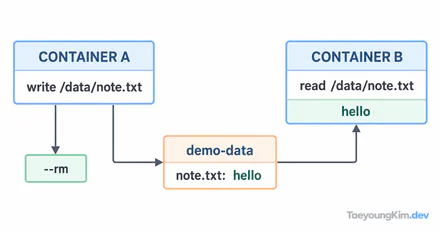
A container adds a writable layer on top of an image. A stopped container differs from a removed container. Without --rm, you can still see a stopped container in docker container ls -a; the writable layer of a container that will be removed is not a suitable place for durable data. Put important data in a volume or external storage so containers can be replaced.
If the image exists but run fails, repeating docker image ls will not identify the cause. Separate image retrieval errors from failures in the startup command, port conflicts, and the process inside the container. For a long-running service, use docker container ls -a to see whether it exited, then inspect logs and the exit code. For a one-off command, disappearance from the list may simply be the result of --rm.
In production, do not rely only on a mutable tag such as latest; keep a traceable identifier for the deployed image version. Treat replacing a container and preserving its data as separate operations. Avoid putting unnecessary files or secrets in an image.
Key takeaways
An image is a runtime package; a container is an instance started from it. Distinguish pull from run, and stopping from removing. Keep versions traceable and important data outside the container.