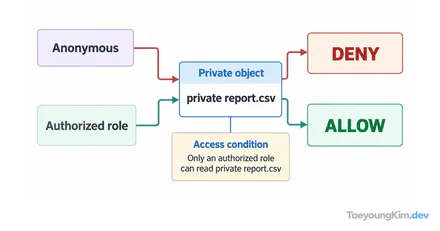
If AccessDenied persists after adding an Allow policy to a role, an explicit Deny in another applicable policy may override that permission. IAM does not grant a request merely because one Allow statement exists somewhere.
Distinguish implicit from explicit denial
For the same GetObject request, an applicable Allow and explicit Deny result in denial. If no rule allows DeleteObject, that is an implicit denial rather than an explicit one.
Without an Allow, a request is denied by default. When an applicable statement explicitly says Effect: "Deny", the request is denied even if another policy allows it. Organization-level policies, permissions boundaries, resource policies, and session policies can all affect the result, so do not inspect only one role policy file.
Consider a fictional read request. One policy allows s3:GetObject, but another applicable policy denies access to that same object path. The final result is a denial. Conversely, if neither policy mentions deletion, s3:DeleteObject is denied by default. In neither case should you assume that attaching one more Allow policy will solve the problem.
Check the request context before widening permissions
Identify the actual caller, target resource, Region, API action, and condition keys. Adding Action: "*" and Resource: "*" may make a quick test pass while destroying the permission boundary. Allow only the actions needed in the smallest practical scope, and check whether a condition caused the denial.
Start diagnosis with the action name and resource identifier in the error, then compare Allow, Deny, and conditions in every applicable policy for that same request context. Even if you use a policy simulator, verify that it represents the actual resource policies and organization-level boundaries.
A small Allow-versus-Deny policy example
Imagine both of these statements apply to one request. s3:GetObject on the object is included in the Allow, but also in the broader Deny, so the request is denied. This excerpt illustrates policy evaluation; it is not a complete policy to paste into an account.
[
  { "Effect": "Allow", "Action": "s3:GetObject", "Resource": "arn:aws:s3:::example-bucket/*" },
  { "Effect": "Deny", "Action": "s3:*", "Resource": "arn:aws:s3:::example-bucket/*" }
]
When you see AccessDenied, first write down the caller, API action, and resource. Then inspect explicit Deny statements and conditions in identity and resource policies. Another Allow cannot override an applicable Deny.
Key takeaways
In IAM, an explicit Deny takes precedence over Allow, and the absence of an Allow results in implicit denial. Diagnose permission errors using the caller, action, resource, conditions, and applicable policy layers. Fix the cause within a least-privilege policy instead of masking it with a broad Allow.