If push changes a React state array but the list on screen does not update—or some views show an old value—the array may have been mutated in place. Update state by passing a new value, rather than relying on the mutation itself.
Create a new array instead of calling push
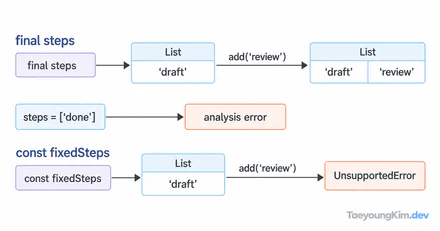
The diagram compares passing the same array reference with creating a new one. The IDs in this example identify list items.
import { useState } from "react";

function TodoList() {
  const [todos, setTodos] = useState([{ id: 1, title: "Read", done: false }]);

  function addTodo() {
    setTodos((current) => [
      ...current,
      { id: Math.max(0, ...current.map((todo) => todo.id)) + 1,
        title: "Write", done: false },
    ]);
  }

  return <>
    <button onClick={addTodo}>Add</button>
    <ul>{todos.map((todo) => <li key={todo.id}>{todo.title}</li>)}</ul>
  </>;
}
Each click adds an item. The numeric ID calculation is only for a tiny illustrative list; use stable IDs supplied by a server for server-backed data. todos.push(newTodo); setTodos(todos) mutates the original and passes the same array reference. Spread creates a new array. A functional update computes from the latest state even when several updates are scheduled close together.
Express edits and removals with map and filter
function markDone(id) {
  setTodos((current) => current.map((todo) =>
    todo.id === id ? { ...todo, done: true } : todo
  ));
}

function removeTodo(id) {
  setTodos((current) => current.filter((todo) => todo.id !== id));
}
Place these functions inside TodoList. markDone(1) creates a new array and a new object for the changed item; removeTodo(1) creates an array without that item. Copy changed objects too. Mutating an inner todo object while only copying the outer array can surprise other state that shares the object or code that relies on memoization.
Keys should identify items, not positions
Use a stable key such as key={todo.id}. An array index as a key in a list that can be deleted or sorted may make React associate an input or focus state with the wrong item. If the server does not provide an ID, create a stable one when the item is added.
Verify that an update leaves the original alone
const before = [{ id: 1, done: false }];
const after = before.map((todo) =>
  todo.id === 1 ? { ...todo, done: true } : todo
);
console.assert(before[0].done === false);
console.assert(after[0].done === true);
console.assert(before !== after && before[0] !== after[0]);
Check that both the array and changed object have new references. In the component, also add items quickly, delete the first item, and verify the remaining titles and checked states. The pure-array test catches mutation; a screen test can expose a bad key that moves focus or input state after deletion.
Key takeaways
Treat React state arrays and their changed objects as immutable. Spread expresses addition, map expresses replacement, and filter expresses removal. Use stable keys for rendering and functional state updates when changes may be queued close together.