Making an entire S3 bucket public just to display files on a website can expose uploads and backups too. Public access depends on the combination of bucket settings, object permissions, policies, and the delivery path. Decide first which files each audience must read.
Start with blocked public access and least privilege
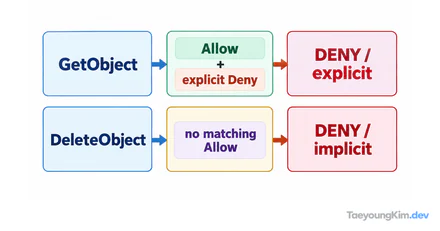
The diagram compares only two requests for one private report.csv object. It illustrates anonymous reads being denied and a role with the needed read permission being allowed. Actual results also depend on Block Public Access settings and applicable policies and conditions.
Start a new bucket with public access blocked, then give the application role or a specific delivery service only the read and write permissions it needs. Mixing object ACLs and bucket policies in several ways makes the effective permissions harder to trace. Keep the team's access model simple.
For example, visitors may need to see logo.png while only internal users may read report.csv. Do not apply one public policy to both files. Check Block Public Access at the bucket and account levels, and allow only the required roles to access private files. Disabling a public-access block does not itself make files public; a single line of bucket policy is not enough to determine the final access result either.
| Request to check | Expected access |
|---|---|
An anonymous user reads report.csv directly from S3 | Denied |
An application role reads report.csv | Allowed only within the necessary scope |
A visitor views logo.png through the delivery path | Allowed through that path |
Test these requests separately. Seeing an image load is not evidence that the whole bucket is safely configured.
Consider a dedicated delivery path for public static assets
Images, CSS, and downloads intended for visitors can be separated into a dedicated bucket and a delivery layer such as a CDN. Keep original uploads, logs, and private data out of that path, and set caching and access policies to fit its purpose.
When verifying access, check separately that an unauthorized request fails and that a service role can perform only the reads it needs. If an object URL returns 403, do not immediately widen the public policy. Compare the caller and path, account- and bucket-level public access blocks, bucket policy, and object ownership settings in order. Give an upload role only the write scope it needs, separate from read access.
Key takeaways
Start S3 storage with Block Public Access and least privilege. Separate files intended for public delivery from private data, and review bucket policies, object permissions, and delivery paths together. A requirement to display a file on the web does not imply that the entire bucket should be public.