If document.querySelector("#save") returns null, the selector may be correct. JavaScript may have run before the browser parsed the button's HTML.
defer runs the script after HTML parsing
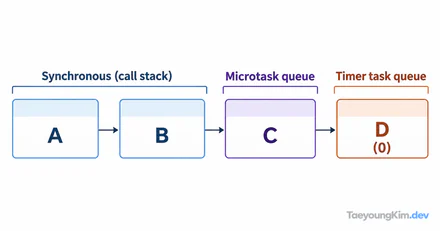
An external script with defer downloads while HTML is being parsed and runs after parsing finishes. DOMContentLoaded occurs after that execution; it does not mean that all images and other resources have loaded.
For an external script, adding defer in the document's head is a simple approach.
<head>
  <script src="app.js" defer></script>
</head>
<body>
  <button id="save">Save</button>
</body>
A deferred script downloads during document parsing and runs in order after parsing. The code in app.js can therefore find the button. A normal script in the head pauses HTML parsing for download and execution, which can both cause this issue and delay the initial page.
DOMContentLoaded signals that the DOM is ready
If the code is loaded another way, or you want to state the initialization point explicitly, use the event.
document.addEventListener("DOMContentLoaded", () => {
  const saveButton = document.querySelector("#save");
  if (!saveButton) throw new Error("#save button is missing");
  saveButton.addEventListener("click", () => {
    saveButton.textContent = "Save button clicked";
  });
});
DOMContentLoaded fires after HTML parsing and deferred-script execution. Unlike the load event, it does not wait for every external resource such as an image to finish loading. Using window.onload for simple DOM initialization can therefore delay it unnecessarily.
Connect the HTML and JavaScript above and click the button to check that its text changes. You can also log document.querySelector("#save") !== null from app.js and confirm that it prints true. If the result remains null, inspect the actual HTML id and script-loading errors in DevTools first. You do not need both defer and the event listener here; choose the approach that fits the page.
Identify the cause instead of ignoring null
Optional chaining with ?. avoids an exception during initialization, but it can silently disable a feature when a required button is missing. For a required element, throw a clear error during development; check for presence only when the element is intentionally conditional.
An element inserted later is a separate case from DOM readiness. Attach its listener in the code that inserts it, or use event delegation on an ancestor.
Key takeaways
Code that selects an element must run after the relevant HTML is parsed. Load an external script with defer or initialize on DOMContentLoaded. When a selector returns null, distinguish selector errors, loading order, and dynamic rendering to find the cause quickly.