Having backups enabled is different from having a recovery plan. RDS automated backups and manual snapshots differ in how they are created, retained, and used. Before a data change or an incident, decide which recovery point you would need in each case.
Automated backups support an operational recovery window
Automated backups let you choose a point within the available recovery window. A snapshot restores the state captured when it was saved. In both cases, validate the data in the newly restored instance before switching application connections.
Set backup retention and the backup window to match the service's recovery requirements. If an incident requires point-in-time recovery, first determine how far back you must go and how quickly service must resume. Also check whether the backup process conflicts with workload or maintenance windows.
For example, if you discover an incorrect data change at 10 a.m., merely knowing that yesterday's snapshot exists may not be enough. Decide whether you need the state from 9:55 a.m. or the previous night, then check the automated backup's available recovery range. It is safer to verify the required data in a new restored instance before changing the original database.
A manual snapshot can mark a point before a change
Before a schema migration or large data operation, a snapshot with a clear purpose and retention owner can help. Do not assume that restoring it overwrites the original instance in place. A restore generally leads to a new instance and endpoint, so plan how to validate it, switch application connections, and roll back if needed.
During a recovery test, connect to the new endpoint in a read-only manner, check row counts and sample data in key tables, and inspect connection settings before and after the application switch. Record whether the restore fits the required recovery time; otherwise the backup policy has not been tested against the actual requirement.
A backup's existence does not prove that you can restore it
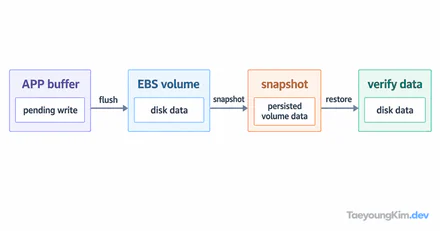
Write down a recovery procedure for a particular row in a test database. Take a manual snapshot before changing it, restore that snapshot to a separate DB instance, and query the reference row as below. Replace the sample table and ID with ones from your own test database.
SELECT id, status FROM orders WHERE id = 42;Comparing the row in the original and restored instances makes both the snapshot time and the validation target explicit. Point-in-time recovery from automated backups depends on the configured retention period. Restoring a snapshot creates a new instance rather than rewinding the original in place. A recovery plan is complete only after testing the connection-string switch too.
Key takeaways
Automated backups suit an operational recovery window; manual snapshots capture deliberate reference points. For either one, practice the restore time, connection switch, and data checks instead of merely confirming that a backup exists. Until you restore and verify it, a backup is still an assumption.