You put @Transactional on a test, save a member, and expect the row to disappear when the test ends. The next test still finds that member. Before assuming the annotation failed, ask whether the save ran inside the test-managed transaction.
What does a @Transactional test roll back?
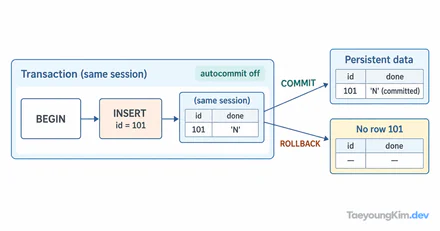
In a Spring test, @Transactional on a test class or method starts a test-managed transaction for each method and normally rolls it back afterward. A save that participates in that same transaction is undone.
@SpringBootTest
@Transactional
class MemberRepositoryTest {
    @Autowired MemberRepository members;

    @Test
    void saveMember() {
        members.save(new Member("Ana"));
        assertThat(members.count()).isEqualTo(1);
    }
}
This example assumes an empty test database and a repository save participating in the test transaction. The test can see its own row and count 1, while rollback removes the new row at the end. @SpringBootTest alone does not imply this rollback.
The diagram contrasts a direct repository write with an HTTP request handled in a separate server transaction. The test's rollback reaches the first, not a server write that has committed separately.
Why does a real HTTP request leave data behind?
Now suppose the test sends an HTTP request to an actual server port:
@SpringBootTest(webEnvironment = SpringBootTest.WebEnvironment.RANDOM_PORT)
@Transactional
class MemberApiTest {
    @Autowired TestRestTemplate http;

    @Test
    void createMember() {
        http.postForEntity("/members", new CreateMemberRequest("Ana"), Void.class);
    }
}
TestRestTemplate sends the request to a real server running outside the test method's thread. The server's request transaction is separate. If the server commits its save, rolling back the test transaction cannot undo that row. The Spring Boot testing reference explicitly distinguishes client and server transactions for real-port tests.
The repository and API classes here are minimal comparison snippets. A runnable project also needs the Member type, request DTO, API endpoint, and repository implementation. Do not treat either snippet as a complete application.
Where should you look when test data remains?
First distinguish a direct repository call from a request over a real HTTP port. Then check where @Transactional is applied and whether the code that saved data joined the test's transaction. @Rollback(false) or @Commit can also change the default behavior.
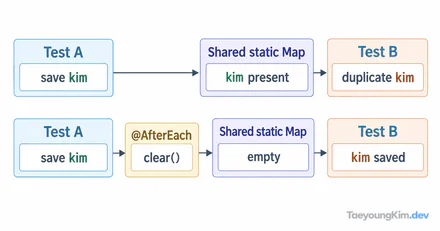
For real HTTP integration tests, use a dedicated test database, isolate each test's input, and define explicit setup and cleanup. A deletion in @BeforeEach that runs inside a test transaction can itself be rolled back; do not assume it will remove data previously committed by the server. For parallel tests, use separate keys or isolation so one test does not delete another's rows.
Do not treat MockMvc tests and real-port tests as the same execution path. In either case, the decisive question is whether the save actually participates in the test-managed transaction. A green test does not prove its data was isolated.
Key takeaways
@Transactional normally rolls back the transaction managed for a test method. It undoes a save within that boundary, but not a write committed by a separate HTTP server transaction in a RANDOM_PORT test. When data remains, trace request path → transaction boundary → cleanup policy.