If you terminate one EC2 instance and another appears shortly afterward, the Auto Scaling group is likely doing what it was configured to do. Its desired capacity is still one. Distinguish the number of instances currently visible from the number the group is trying to maintain.
How do minimum, desired, and maximum capacity differ?
An Auto Scaling group launches instances from its launch template and adjusts group capacity within configured bounds. Each setting has a different role:
| Setting | Example | Meaning |
|---|---|---|
| Minimum capacity | 1 | Lower bound when scaling in |
| Desired capacity | 1 | Current target to maintain |
| Maximum capacity | 2 | Upper bound for scaling out |
The relationship is minimum ≤ desired ≤ maximum. One instance is expected initially. If a scaling policy changes desired capacity to two, the group can start another instance; the configured maximum prevents the policy from raising it beyond two. Maximum is a limit, not the normal instance count. This example assumes each instance contributes one capacity unit; weighted groups can count capacity differently.
The diagram places the initial target at one and the upper bound at two. Changing desired capacity to two tells the group to maintain that target; it does not turn the maximum into the normal size. AWS's capacity limits documentation describes these bounds.
Why does a terminated instance reappear?
In this example, terminating the only running instance changes the observed count to zero while desired capacity remains one. The group tries to launch a replacement. Terminating an instance and changing the group's desired capacity are different operations. This is an illustration, not a suggestion to terminate an instance in a real account.
| Point in time | Observed instances | Desired capacity | Where to look |
|---|---|---|---|
| Initially | 1 | 1 | Group capacity |
| Just after termination | 0 | 1 | Group activity history |
| After replacement starts | 1 | 1 | Instance and target-group health |
A replacement appearing does not mean it can immediately serve requests. Check the launch template and AMI, target-group registration, and health checks. Group activity history explains why the instance was launched; target-group health shows whether it is ready for traffic.
What if CPU is high but the group does not scale out?
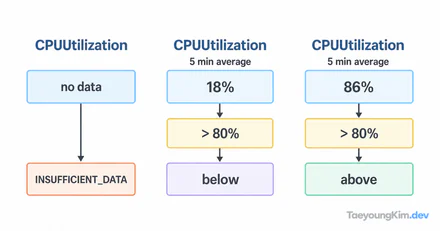
Compare the observed count with minimum, desired, and maximum first. If there are already two instances, this example's maximum blocks further scale-out. If there is one, check whether a scaling policy exists, whether it watches the expected metric, and whether activity history reports a failure. A CPU graph alone does not prove Auto Scaling is broken.
Application consistency is another issue. If two instances each store blog posts in their own local database, a load balancer may send a request to either one and make a post appear or disappear between requests. Increasing instance count does not share data automatically. Check for a shared store or external database.
How should you choose production capacity?
Minimum capacity relates to baseline headroom; maximum capacity bounds load response and cost. With a minimum of one, there is no spare instance while a replacement starts after that instance fails. Before raising the maximum, check instance startup time, target-group health, and where application data lives. To reduce capacity for maintenance, change the group's target with a traffic plan rather than terminating an instance and leaving the target unchanged.
Key takeaways
Minimum is the lower bound, desired is the current target, and maximum is the upper bound. If you terminate an instance without changing desired capacity, the group tries to replace it. Investigate the three capacities → group activity → instance and target-group health → application data.