An EC2 instance may have a different connection address after it is stopped and started. An automatically assigned public IP is not a permanent name for the instance. Designing clients to remember a server's IP directly makes replacement and incident response harder.
Separate the address from the service name
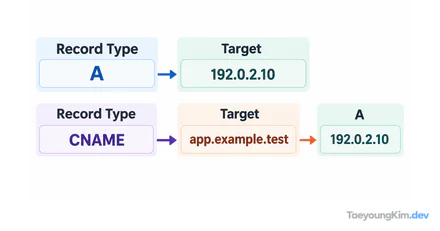
An automatically assigned public IP can change after a stop and restart. An Elastic IP lets you manage the address separately from its association with an instance. The addresses in the diagram are examples used to show the difference.
Give users a DNS name, then point that name to a load balancer or the current service endpoint. This makes it easier to preserve the connection name when an instance is replaced. For a service scaled across multiple instances, consider a load balancer instead of one instance's public IP as the entry point.
For example, if a test instance no longer responds at its old IP after being stopped and started, compare its currently assigned public address with the value of the DNS record. Check those two addresses before changing browser caches or security groups. If a private instance has no public address, do not assume it can be reached directly from the internet.
Which values should you compare after an address change?
Imagine an instance that was reached through an automatically assigned public IPv4 address. After a stop and start, its address changes. A client configured with the old IP cannot connect, even if the new server is healthy.
| Check location | Old value | Check after restart |
|---|---|---|
| EC2 public IPv4 | Temporary address A | See whether the current address is B |
| DNS A record | Address A | See whether it still points to A |
| Client configuration | Address A | Check whether it can use a DNS name instead of a fixed IP |
Compare addresses and DNS before restarting the application or widening security rules. If DNS points to address B and the connection still fails, then inspect instance health, listening ports, and security groups. This separates address problems from server problems.
What else must you manage if a fixed IP is required?
For an integration where the IP address itself is part of the contract, such as an external system's allowlist, consider an Elastic IP. A fixed address alone does not automatically recover a failed instance. Decide which instance it is associated with, who will reassociate it during replacement, and when to release it. For a web service spanning multiple servers, a load balancer plus DNS may be a better entry point.
Key takeaways
An instance's automatically assigned public IP is a poor permanent service address. Give users a stable entry point through DNS and, where appropriate, a load balancer. Manage a fixed IP explicitly only where an integration requires it. Replacing a server should not become an address-change incident.