You edit /welcome.html, but the browser still shows the old message. Before assuming it is a cache issue, check whether a controller also handles that URL. Following the same request through controller mapping and static resource handling reveals which response wins.
A controller mapping takes precedence in this setup
In a typical Spring Boot MVC configuration, a matching controller method is selected before the static resource handler. Assume the app has src/main/resources/static/welcome.html and a controller responding to the exact same /welcome.html path.
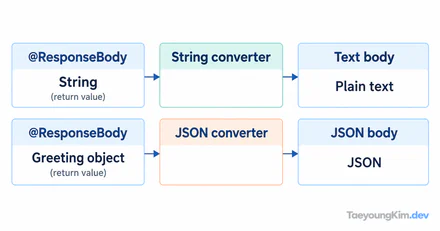
The diagram compares the same request in two configurations. With the controller mapping, the response is controller page; without that mapping, the static file can answer with static page.
Give each source a distinct response to make the selection visible:
@Controller
class WelcomeController {
    @GetMapping("/welcome.html")
    @ResponseBody
    String welcome() {
        return "controller page";
    }
}
Because of @ResponseBody, this string is the HTTP response body, not a view name. With the mapping active, /welcome.html returns controller page even if the static file exists. Remove or change the controller mapping, then request the same URL again to see the static file. Spring Boot's servlet web application reference describes controller mappings and its default static resource locations.
The static file is a candidate when no mapping handles the path
Spring Boot serves files from default static locations when no higher-priority handler handles the request. A file under src/main/resources/static maps to a URL path:
src/main/resources/static/welcome.html
                 └── /welcome.html
Now remove only the controller mapping and repeat the same /welcome.html request. A static page response means the file was present but hidden behind the earlier mapping. /welcome is a different URL; this file does not automatically serve it.
Check the path and the response separately
First request /welcome.html with both controller and static file present. Then remove only the controller mapping and request the identical path. Changing the URL too would make it harder to identify which configuration changed the result.
Request: /welcome.html | Expected body | Check first |
|---|---|---|
| Controller mapping present | controller page | Mapping and @ResponseBody |
| Controller mapping removed | static page | Static file location and name |
If neither outcome appears, inspect the requested path, active profile, and custom resource handler configuration. If a controller should return a view name instead of body text, remove @ResponseBody and check the template location. The same string has different meaning as a response body and as a view name.
Separate static and dynamic URL responsibilities
Keeping static files under a recognizable path such as assets/ or docs/ and dynamic screens under controller URLs avoids relying on handler-order trivia. A test should check more than status 200:
mockMvc.perform(get("/welcome.html"))
    .andExpect(status().isOk())
    .andExpect(content().string("controller page"));
This expectation applies with the controller mapping active. In a separate test without it, check for static page. Static resources suit file delivery; controllers suit decisions involving inputs, data, or authorization. Avoid assigning the same URL to both responsibilities.
Key takeaways
For the same /welcome.html request in this standard configuration, the matching controller responds first; without it, the static file can respond. Compare distinct bodies at the same URL. Treat /welcome as its own path and keep static and dynamic routes intentionally separate.