It is common to run chmod 755 deploy.sh when you only want to make a deployment script executable. The script may run, but if you did not inspect its original mode, you may have also granted group and other users read and execute access. Decide whether you mean to add a permission or set a complete mode.
chmod 755 does not merely add execute permission
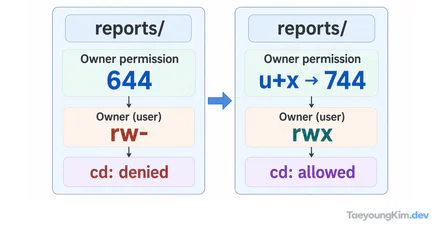
From mode 640, chmod 755 broadens permissions for group and other users. chmod u+x adds only owner execute permission and produces 740 in this example.
The three octal digits describe owner, group, and other users. 7 is read, write, and execute; 5 is read and execute. Thus chmod 755 deploy.sh sets the file's mode to rwxr-xr-x, regardless of its previous mode.
If the script starts at 640, its owner can read and write it, the group can read it, and other users have no permission:
640 = rw-r-----Setting 755 gives execute access to the owner and group, and grants other users both read and execute access. The script becoming executable does not mean the change was limited to one bit:
755 = rwxr-xr-xUse chmod u+x to add only owner execute permission
Symbolic mode names the target and operation: u means the owner, + means add, and x means execute.
chmod u+x deploy.shApplied to the same 640 file, it produces 740:
Initial:   640  rw-r-----
chmod u+x: 740  rwxr-----
chmod 755: 755  rwxr-xr-x
u+x changes only the owner's execute bit. Existing group read access and other-user permissions remain as they were. That matters when the existing mode was deliberately restricted.
Check the change on a temporary file
Compare the commands on an empty temporary file rather than a production script:
demo_dir=$(mktemp -d)
touch "$demo_dir/deploy.sh"
chmod 640 "$demo_dir/deploy.sh"
ls -l "$demo_dir/deploy.sh"

chmod u+x "$demo_dir/deploy.sh"
ls -l "$demo_dir/deploy.sh"

chmod 755 "$demo_dir/deploy.sh"
ls -l "$demo_dir/deploy.sh"
Reading just the mode field gives this sequence:
-rw-r-----  deploy.sh
-rwxr-----  deploy.sh
-rwxr-xr-x  deploy.sh
The first change adds only the owner's x; the final command replaces all three groups of permission bits. Checking ls -l after a mode change catches mistakes more reliably than memorizing an octal number alone.
Even a file with mode 755 is not accessible to another user unless that user can traverse its parent directories. This example compares file permission bits, not every access-control factor.
When should you use numeric or symbolic mode?
Numeric mode is useful when you intentionally standardize a complete mode. If a team rule says an executable must be 750, chmod 750 applies that full rule.
For an existing file where only one bit should change, symbolic mode makes the intent clear:
# Add execute permission for the owner only
chmod u+x deploy.sh

# Remove write permission from the group only
chmod g-w deploy.sh

# Add read permission for all users
chmod a+r README.txt
Before widening access, consider whether the file contains secrets or deployment configuration. chmod 777 is not a diagnosis for an execution failure; it can unnecessarily allow writes. Also check whether the executing user can read the file and traverse its parent directory.
Key takeaways
chmod 755 sets all nine read/write/execute bits to rwxr-xr-x. To preserve existing permissions while making only the owner able to execute a 640 file, use chmod u+x and inspect the result with ls -l.