If you loop over an array and get undefined instead of a result, you may have used forEach as though it were map. Both visit the elements, but one is for building a transformed array and the other is for performing work during iteration.
map creates a new array of transformed values
map returns a new array; forEach returns undefined. The callbacks shown in the diagram do not modify the source array.
const prices = [1000, 2500, 3000];
const labels = prices.map((price) => `$${price.toLocaleString('en-US')}`);

// ["$1,000", "$2,500", "$3,000"]
The map callback must return each transformed value. If it uses braces, remember an explicit return:
const doubled = prices.map((price) => {
  return price * 2;
});
console.assert(doubled.join(",") === "2000,5000,6000");
With braces but no return, map still makes an array of the same length, but each new slot contains undefined. If the UI shows empty entries, compare the source and transformed arrays separately.
const missing = prices.map((price) => {
  price * 2;
});
console.assert(missing.every((value) => value === undefined));
forEach is for work done during iteration
prices.forEach((price) => {
  console.log(price);
});
const result = prices.forEach(() => {});
console.assert(result === undefined);
Logging or sending a command to an existing object does not need a returned array, so forEach signals that intent. Chaining another array method onto its return value fails because that value is undefined. The MDN array method references distinguish this use from a transformation whose returned array matters.
Check object mutation as well as the return value
Neither method automatically changes the elements of the original array. A callback can, however, mutate an object that both arrays reference. For UI state or function inputs, copy the fields you need into a new object:
const products = [{ id: 1, price: 1000 }];
const discounted = products.map((product) => ({
  ...product,
  price: product.price * 0.9,
}));
console.assert(products[0].price === 1000);
console.assert(discounted[0].price === 900);
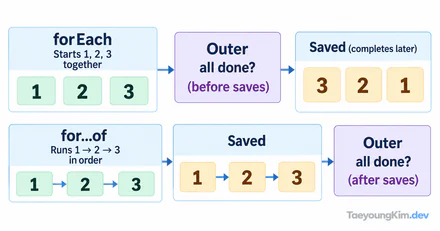
Choose by the result you need, not a vague performance assumption. In a state update, verify that changed objects inside the new array are new too. Logging fits forEach; if its callback starts network requests, design a separate way to await their completion and handle failures. forEach's return value does not do that.
Test the returned and original arrays together
const prices = [1000, 2500];
const doubled = prices.map((price) => price * 2);
const seen = prices.forEach(() => {});
console.assert(JSON.stringify(doubled) === '[2000,5000]');
console.assert(seen === undefined);
console.assert(JSON.stringify(prices) === '[1000,2500]');
Test transformed values, not just array length. For arrays of objects, also verify that the callback did not quietly mutate the originals. If map's returned array is never used, check whether the method expresses the intended behavior.
Key takeaways
Use map when you need a new array and forEach for work whose return value you do not need. Return a value from a braced map callback, and check that object transformations leave the original objects unchanged.