You create an EC2 CPU alarm and keep refreshing your inbox, but no email appears. Separate two questions first: Has CloudWatch entered ALARM at all, or has it entered ALARM while the SNS email subscription remains unconfirmed? The evidence and fix differ.
Why can a high-looking CPU graph still show insufficient data?
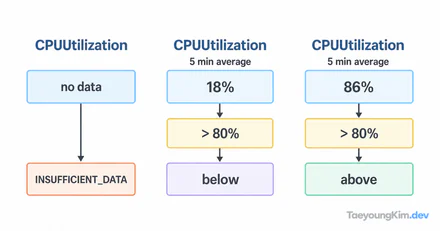
Suppose the alarm uses a five-minute CPUUtilization average, a threshold greater than 80%, and requires one breaching period out of one evaluated. Immediately after creation, there may be no usable datapoint yet, so the alarm can be INSUFFICIENT_DATA. That state means the alarm lacks enough data to decide; it does not mean CPU is safe or already above the threshold. CloudWatch documents missing-data evaluation choices.
The diagram follows the example's ALARM notification path. Missing data yields INSUFFICIENT_DATA under its chosen treatment. Even after ALARM, email requires a confirmed SNS subscription; alarm state and subscription state must be checked separately.
These figures illustrate evaluation, not measurements from an AWS account:
| Evaluation point | Latest five-minute average | Is it > 80%? | Alarm state |
|---|---|---|---|
| Immediately after creation | No datapoint | Cannot evaluate | INSUFFICIENT_DATA |
| First datapoint | 4.2% | No | OK |
| Datapoint after load | 99.8% | Yes | ALARM |
Exactly 80% does not satisfy > 80%. The alarm does not email the instant a graph line spikes: the configured period must provide a datapoint, then the alarm evaluates it and changes state. A five-minute average is not “any instant above 80% during five minutes.”
What if the alarm is ALARM but no email arrives?
Inspect the alarm's state history for a real OK → ALARM transition. If none occurred, check metric name, instance dimension, evaluation period, and threshold before investigating SNS. If it did occur, verify that the alarm's action publishes to the intended SNS topic on ALARM.
Then inspect the topic's email subscription. Entering an address does not complete a subscription: the recipient must click the confirmation link. Until then, PendingConfirmation prevents delivery. AWS's SNS email guide describes the confirmation step.
CPU five-minute average 99.8% → CloudWatch enters ALARM → SNS topic
                                                    ├─ Pending confirmation → no email delivery
                                                    └─ Confirmed subscription → email can be delivered
Confirming a subscription after the alarm has already changed state should not be treated as a request to replay that old notification. Verify the path with a later state transition or an appropriate topic test.
What order helps diagnose a silent alarm?
Check alarm state → metric datapoints → alarm action → SNS subscription. In INSUFFICIENT_DATA, inspect incoming metrics and missing-data treatment. In OK, compare evaluated averages with the threshold. In ALARM, inspect state history, the configured SNS topic, and whether the email subscription is confirmed.
For a production alarm, decide whether one breaching period out of one is too sensitive. Treating missing data as automatically healthy may also conceal failures. Choose period, evaluation count, and missing-data policy for the metric's reporting frequency and your response needs; this article's 80% and five minutes are only example settings.
An OK CPU alarm does not prove that the application responds correctly. A running EC2 instance with an unhealthy ALB target needs separate health-check diagnosis.
Key takeaways
Do not rebuild both the alarm and SNS topic just because an email is missing. First identify whether CloudWatch is INSUFFICIENT_DATA, OK, or ALARM. After an ALARM transition, check the notification action and SNS email confirmation. Separate whether the metric breached from whether the message could be delivered.