You meant to activate member 2, but a query now shows all three members as active. The UPDATE succeeded; the database did not ask whether you intended to change everyone. If you have not committed, stop and inspect the scope. These three rows show where it widened and how to undo it.
How many rows does UPDATE change without WHERE?
SET chooses the new value; WHERE chooses which rows receive it. All three members in this SQLite example begin as pending. Run the statements in order on the same connection.
CREATE TABLE members (
  id INTEGER PRIMARY KEY,
  name TEXT NOT NULL,
  status TEXT NOT NULL
);

INSERT INTO members (id, name, status) VALUES
  (1, 'Ada', 'pending'),
  (2, 'Ben', 'pending'),
  (3, 'Cia', 'pending');

BEGIN;
UPDATE members SET status = 'active';
SELECT changes() AS affected_rows;
SELECT id, status FROM members ORDER BY id;affected_rows
3
id status
1 active
2 active
3 activeWithout WHERE, all three rows are targets, not only member 2. changes() is a SQLite function reporting the number of rows affected by the preceding statement. Compare that count with the actual IDs; the number alone cannot tell you whether the right members changed.
The diagram contrasts an unrestricted update with WHERE id = 2. Check both affected IDs and row count before committing.
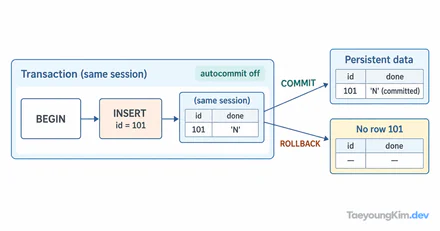
What can ROLLBACK undo before COMMIT?
The example started a transaction with BEGIN and has not called COMMIT. On that same connection, ROLLBACK undoes the three updates:
ROLLBACK;
SELECT id, status FROM members ORDER BY id;id status
1 pending
2 pending
3 pendingA later ROLLBACK cannot simply undo a change that was already committed. Recovery then needs a separate plan using change history or backups. Transaction syntax and autocommit settings differ by DBMS, so check the connection settings before changing real data.
How do you target just one row safely?
First preview the intended ID with the same condition. Include both id = 2 and the expected old status in the UPDATE predicate. Keep preview, update, and commit within the same transaction.
BEGIN;
SELECT id, status
FROM members
WHERE id = 2 AND status = 'pending';

UPDATE members
SET status = 'active'
WHERE id = 2 AND status = 'pending';
SELECT changes() AS affected_rows;
COMMIT;

SELECT id, status FROM members ORDER BY id;Previewed row: 2 pending
affected_rows: 1
id status
1 pending
2 active
3 pendingCheck that the previewed ID is correct, the update affected the expected one row, and the final state is right. Do not trust the preview alone: another operation may modify data between the read and update. Keep the condition on the UPDATE itself and inspect its result. If it differs from expectations, investigate instead of committing.
Key takeaways
An UPDATE without WHERE targets the whole table. Preview the target IDs, update in a transaction, and compare affected rows with the expected result. If the result is wrong and still uncommitted, use ROLLBACK. A committed change requires a separate recovery procedure.