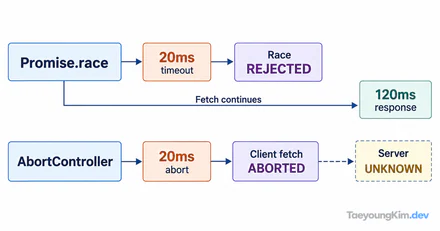
If an old request arrives after you move to a new screen and overwrites newer results, or one resize triggers several handlers, work created by an effect may not have been cleaned up. React runs an effect's cleanup before the next setup with changed dependencies and when the component unmounts.
Remove an event listener with the same function reference
The effect registers onResize; cleanup removes that exact listener. Passing a different anonymous function to removeEventListener would not remove the original registration.
import { useEffect, useState } from "react";

function WindowWidth() {
  const [width, setWidth] = useState(0);

  useEffect(() => {
    function onResize() {
      setWidth(window.innerWidth);
    }

    onResize();
    window.addEventListener("resize", onResize);
    return () => window.removeEventListener("resize", onResize);
  }, []);

  return <p>Window width: {width}px</p>;
}
The effect reads the browser width after mount, so the component can also render in an environment without window during initial rendering. Resizing updates the number; unmounting removes the listener. Think of cleanup as the matching disconnection for an external system. In development Strict Mode, an extra setup-and-cleanup cycle can appear; what matters is that listeners do not accumulate. The React useEffect reference documents the cleanup lifecycle.
Abort or ignore an outdated request
import { useEffect, useState } from "react";

function SearchResults({ query }) {
  const [results, setResults] = useState([]);
  const [error, setError] = useState(false);

  useEffect(() => {
    const controller = new AbortController();
    setError(false);

    fetch(`/api/search?q=${encodeURIComponent(query)}`, { signal: controller.signal })
      .then((response) => {
        if (!response.ok) throw new Error("search failed");
        return response.json();
      })
      .then(setResults)
      .catch((reason) => {
        if (reason.name !== "AbortError") setError(true);
      });

    return () => controller.abort();
  }, [query]);

  if (error) return <p>Please try the search again.</p>;
  return <p>{results.length} results</p>;
}
When query changes, cleanup for the old effect aborts its request before the new effect runs. /api/search is a placeholder for an actual search API in your app. Change the query quickly and verify an old response does not replace newer results. Some APIs do not stop immediately, so some applications also guard result application with a current-request identifier.
The dependency array describes data flow
If an effect reads props or state but leaves them out of its dependencies, it can capture stale values. Including an object or function newly created on every render can instead rerun the effect unnecessarily. Rather than suppressing a lint warning, identify why each value changes and when the effect should reconnect.
Check setup and cleanup counts
Mount and unmount WindowWidth, then resize. If onResize still runs after unmount, confirm that setup and cleanup used the same function reference. Even when development mode repeats the effect, the sequence should be register → remove → register.
For the search example, change query twice quickly and confirm the old request is aborted. An AbortError from that cleanup should not be shown as a user-facing failure. Avoid copying real response bodies or internal URLs into display or logs during debugging.
Key takeaways
Cleanup disconnects listeners, timers, subscriptions, and requests created by an effect before a relevant rerun or unmount. Return matching cleanup from the same effect. Treat the dependency array as a description of when the connection must be refreshed.