The server returns 404 for a todo, but your catch block never runs. A failed network request and an HTTP response reporting failure are different events. fetch() can successfully deliver a Response whose status says the resource was not found.
Why does a 404 response not enter catch?
When fetch() receives an accessible HTTP response, its Promise fulfills with a Response object. That includes responses with status 404 or 500. A 404 alone therefore does not throw in this code:
try {
  const response = await fetch('/api/todos/7');
  console.log(response.status, response.ok); // 404 false
} catch (error) {
  console.log('The request itself failed', error);
}
The comment assumes this endpoint actually returns 404. status is the HTTP code, and ok is true only for the 200–299 success range. response.ok === false does not automatically create an exception. MDN's fetch reference states this distinction.
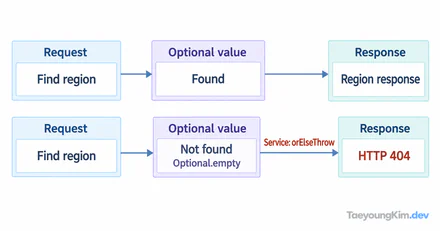
The diagram separates an HTTP error response from a rejected fetch Promise. Checking response.ok and throwing is an action taken by application code; it is not automatic cancellation or a network error.
How should response.ok handle HTTP errors?
Check the status and choose an error path explicitly. A small change around the same request is:
async function loadTodo(id) {
  const response = await fetch(`/api/todos/${id}`);

  if (!response.ok) {
    throw new Error(`Could not load todo: HTTP ${response.status}`);
  }

  return response.json();
}

try {
  const todo = await loadTodo(7);
  console.log(todo);
} catch (error) {
  console.error(error);
}
Now a 404 reaches catch because our code throws after inspecting the response. response.json() is not a success checker. A valid JSON error body can parse successfully, while an HTML error page can cause a separate JSON parsing error.
Reproduce a 404 without an external API
This Node.js 22 example runs a small local server that returns JSON with status 404. fetch() receives the response, then the explicit if throws:
import { createServer } from 'node:http';

const server = createServer((_request, response) => {
  response.writeHead(404, { 'Content-Type': 'application/json' });
  response.end('{"error":"not found"}');
});

server.listen(0, '127.0.0.1', async () => {
  const url = `http://127.0.0.1:${server.address().port}/todos/7`;
  try {
    const response = await fetch(url);
    console.log(response.status, response.ok); // 404 false
    if (!response.ok) throw new Error(`HTTP ${response.status}`);
  } catch (error) {
    console.log(error.message); // HTTP 404
  } finally {
    server.close();
  }
});
This demonstrates the precise point where application code turns an HTTP error response into an exception. To test a network failure, use a genuinely unreachable endpoint or stopped server instead of merely changing the HTTP status; then no Response with a status code arrives.
What should a UI distinguish?
A missing todo may need a “not found” message, while a connection failure may need a retry option. If both error types reach one catch, preserve enough information to tell them apart, such as an error object carrying the HTTP status. Otherwise the UI may encourage endless retries for a resource that does not exist.
Even response.ok === true does not promise JSON. A bodyless response or an API returning another format requires parsing according to that API's contract. Diagnose in order: Did a response arrive? What is its HTTP status? What body format does the API promise?
Key takeaways
A 404 from fetch() is normally a fulfilled Promise containing an error response, not a rejected Promise. Inspect response.ok or status, handle HTTP failure deliberately, and keep network, cancellation, and parsing failures distinct.